Reeder update for iOS 8
If you’ve ever tried to use RSS on iOS, Reeder is an app that you’ve must have stumbled upon. Described as the best RSS app for iOS for a long time by most of the tech scene (and replaced by Jared Sinclair’s/SupertopUnread by some Apple podcasters), Reeder is still my go-to app when I have to tackle some of my untidy RSS feed. updated for iOS 7 with Reeder 2, Silvio Rizzi finally releases an update for iOS 8. It’s what can be described as a minor update, but it’s a much needed one.
The update includes:
New : - iPhone 6 and iPhone 6 Plus support - Support for landscape mode (iOS 8 only) - Standard share sheet → “More…” in Reeder’s share panel (iOS 8 only) Fixed : - Various bug fixes for iOS 8 - Failed authentication error handling
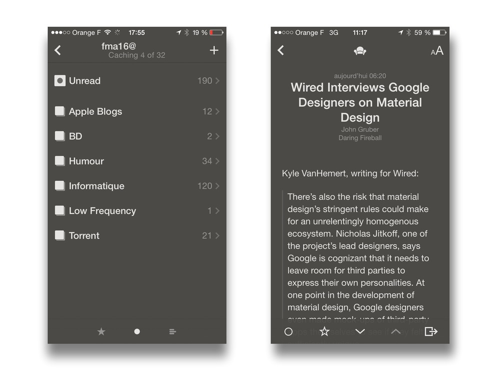
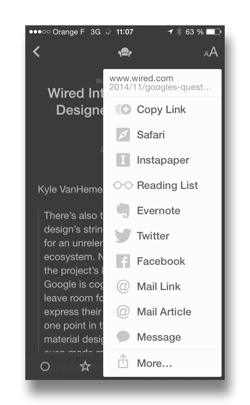
The standard iOS share sheet is hidden in Reeder’s custom share sheet, at the right bottom of the screen. It still privileges Reeder own share extensions, which are very good on their own (Instapaper implementation on Reeder is better than with the classic share sheet : you’re not stuck with a loading screen when you’re saving something, it does everything in the background.)
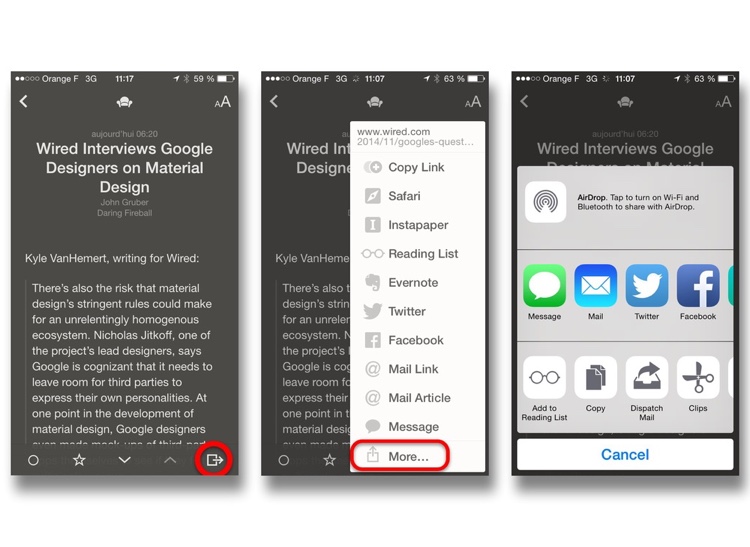
It also integrates the support of the landscape mode on iOS 8 devices, which fixes the inconvenience of having to launch a embed video on the app or the WebView on Safari if you want too see it in landscape -something you should definitively do when you’re viewing a 16:9 video-. This is very much appreciated.
So, this is a very solid update, but I think it’s missing some features, who would be very much welcomed :
- Font choices : Helvetica Neue is boring, and doesn’t make text really easy and enjoyable to read. Adding some choices like [Ideal Sans][0] or some Serif fonts would be great.
- Text justification : Even if some people doesn’t really like justification, I find it helps to make the text more easier to read, and looks better. A properly hyphenation would be great.
- 1Password full integration : This is not a top of the shelf needed update, but it would be great to have a full integration of 1Password (which is compatible with other password managers like Dashlane for third party sharing services (like Pinboard or Instapaper).
Anyways, this update still make Reeder as one of the best -if not the best- RSS reader on iOS. I don’t have a Mac, but if you have, you should definitively check out its Mac OS counterpart.
Nuzzel Workflow - Week One
So, last Thursday, I posted a blog post about the new Nuzzel iPad app, saying that this update (to the already existing iPhone app) and various feedback from famous writers made me rethink a bit my work-flow. So here I am, more than a week after.
The problem of not being a professional blogger.
So, first, I have to make a huge disclaimer before beginning to talk about my experience : things didn’t go as I would have expected.
To begin with, I’m beginning the last month of my semester, which implies an increasing amount of work that I have to tackle every day. This is something that impedes me to write and read as much as I want to. But everything should be okay after the exams, mid-December.
Then, I had some problems with my credit card, who was refusing all my online payments and, thus, my Ars Premier subscription, which, therefore, truncated all my RSS feed, making it a pain to read (even if Ars implementation of RSS is better than most of news’ websites), and discouraged me a bit to take time to read it all. Everything should be fine tomorrow (and I learned that my MasterCard had a threshold on the amount of payments that I make online. This is nuts.)
And I kept the best part for the end : Tuesday, I thought that it would be a good idea to make an Mac OS X virtual machine on my PC, a kinda half-backed Hackintosh. I did succeed to make a pretty good Mavericks install on VirtualBox, but I came to a conclusion that my laptop wasn’t the best computer to do a Hackintosh : I have a 1336x768 resolution screen, and my graphics card -a GeForce 610M- isn’t recognized by Mac OS, making the interface a little bit too much sluggish to be used properly. But the damage was done, and I lost two days in this project (it was kinda fun); and I didn’t even succeeded to update the thing to Yosemite (I have trouble to make VirtualBox boot from an USB, if anyone have some tip, it would be great!).
Keep it simple and useful.
But all of this doesn’t mean that I didn’t used Nuzzel or my RSS reader at all during this week. Nuzzel even proved itself very helpful in one case : it sent me an alert for Tim Cook’s coming out, because 5 of my followers twitted about it. I was delighted when I saw the notification, but the killer feature was this :
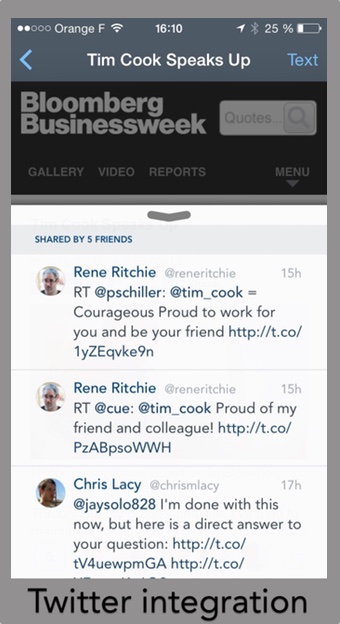
Instead of putting this article in my Instapaper queue, giving the link some context gave me the ability to see if it was relevant or not (in this case, it was). Amazing feature.
Clearly, I would have missed this article if I didn’t used Nuzzel at this time. It would have lost itself in my RSS queue until I took some actions to read it, even if it was relayed by most of the Apple bloggers that I have subscribed to. So you can imagine if it was a more low-key publication put on Twitter by a handful of people when I wasn’t connected? I would have missed it. So the app finds itself quite useful.
So now, let’s move to week 2!
Switching to Squarespace
The switch to Squarespace may have broke all the previous links made on Wordpress. To fix this, just put ‘/blog/’ between the domain name (http://lawgier.net) and the “slug” (/2014/10/XX/name-of-the-article) in your address bar. Thanks.
So, here we are, dealing with my need to experiment things. Testing everything. Never be satisfied. Avoir la bougeotte (have ants in one’s pants would be a good translation).
Before launching the website, I moved to many platforms : Ghost, Scriptogr.am, Postach.io, … I had settled for Wordpress for about a month, mainly because I didn’t found a better solution. I had tried Squarespace a bit, but didn’t found what I was looking for. Until today.
Squarespace 7 is a wonderful platform. The themes are awesome. I had trouble at first because I couldn’t do what I wanted. But those things were mainly a waste of time. Installing 5 plugins to make your blog a little bit reliable in case of dealing with a sudden huge amount of traffic is meh. Having to create a Rackspace Cloud Files instance only to make the website load a bit faster, and wont being able to upload files to it from your iOS device (I’m looking at you, Panic) isn’t really worth it. Won’t be able to know how much the website will cost you at the end of the month because Azure cost calculator is weird and gives you wrong numbers (my cloud instance runs for 4 hours a day -dunno why-, but Azure calculates an 24 hour usage) is bad.
So, Squarespace : 10 bucks a month (use a promo code like ATP to get 10% off your first purchase, but if you’ve already listened to any podcast, youalreadyknowthis), 500 GB Bandwidth, no back-end to deal with, no CDN, blazing fast, great theming, great mobile app (would be even be better if it was supported by Byword).
So, I’m happy. But, until when?
How copyright law gives Amazon too much power over the book industry
Timothy B. Lee, for Vox :
I mostly agree with my colleague Matt Yglesias’s argument that Amazon is doing the world a favor by crushing book publishers. But there’s at least one way US law gives Amazon excessive power, to the detriment of publishers, authors, and the reading public: ill-conceived copyright regulations lock consumers into Kindle’s book platform, making it hard for new e-book platforms to gain traction.
Both Yglesias’s (linked in the quote) and Lee’s arguments are very interesting for me. But Lee is making a point there. DRM on Amazon eBooks and Kindle devices are awful consumer wise. They are punishing you for buying a book by putting so many restrictions, like not being able to use your book on an another device than an approved Kindle, that you don’t get when you pirate it. And those DRMs are ineffective : hackers always find a way to break them.
 Tell me about how useful your DRMs are.
Apple understood that putting DRMs on the music sold on iTunes was much more cumbersome that the benefits that it should have brought, and didn’t succeeded to. So that’s why they make pressure on the Music industry to remove them. But it’s still there for movies, TV shows, and ebooks too. So, if I buy a movie on the iTunes store, the only way for me to watch it on my TV is to buy an Apple TV. I can’t use my Roku 3 or my Playstation 3 or my Chromecast to see them. So, the only way for me is to buy a Blu-Ray, full of DRM too, and incompatible with most computers and ALL Apple devices, or download them on a shady website for free. Using the Playstation Store or the Google Play Store will lead to the same situation : being locked down to only one place. Now, tell me about how useful your DRMs are.
Tell me about how useful your DRMs are.
Apple understood that putting DRMs on the music sold on iTunes was much more cumbersome that the benefits that it should have brought, and didn’t succeeded to. So that’s why they make pressure on the Music industry to remove them. But it’s still there for movies, TV shows, and ebooks too. So, if I buy a movie on the iTunes store, the only way for me to watch it on my TV is to buy an Apple TV. I can’t use my Roku 3 or my Playstation 3 or my Chromecast to see them. So, the only way for me is to buy a Blu-Ray, full of DRM too, and incompatible with most computers and ALL Apple devices, or download them on a shady website for free. Using the Playstation Store or the Google Play Store will lead to the same situation : being locked down to only one place. Now, tell me about how useful your DRMs are.
I think that the entertainment industry should be more focused on enhancing the user experience and satisfaction, instead of seeing bad things everywhere, and threat people like suspected thieves. Removing DRMs and letting people do what whey want with what they bought seems to be a good start.